Pages

Tuesday, July 31, 2012

Spring - Making a self configurable project

In my projects I prefer having self configurable solutions and avoid any additional involvement for deploying an enterprise application (EAR file).  For example, if the project needs to call some web services but the host address depends of the environment where the deploying is occurring (i.e. DEV, QAT, UAT, PROD).  Or you might need specific settings in each environment like DEV where you want to have more traces and debug information.  Imagine having to configure each setting every time you deploy...  plus this is prone to errors.


So how to make the solution self configurable?

In my case I use a combination of the JAVA env variable and Spring.

Set ENV Variable

Configure the JVM which hosts your application and set the vm argument:  -Denv <name>.

For example if using Geronimo application server, I will set this in the Launch Configuration where the VM arguments are configured.

-javaagent:"$(GERONIMO_HOME)/lib/agent/transformer.jar" -Djava.ext.dirs="$(GERONIMO_HOME)/lib/ext;$(JRE_HOME)/lib/ext" -Djava.endorsed.dirs="$(GERONIMO_HOME)/lib/endorsed;$(JRE_HOME)/lib/endorsed" -Xms512m -Xmx1024m -XX:MaxPermSize=512m -Dorg.apache.geronimo.home.dir="$(GERONIMO_HOME)" -Dkaraf.home="$(GERONIMO_HOME)" -Dkaraf.base="$(GERONIMO_HOME)" -Djava.util.logging.config.file="$(GERONIMO_HOME)/etc/java.util.logging.properties" -Dkaraf.startLocalConsole=false -Dkaraf.startRemoteShell=false -Denv=dev

Spring - ENV Configuration

I use Spring Framework to handle many of the dynamic characteristics of the project.  With Spring I can read the JVM env variable and do the following inside the applicationContext.xml file to achieve a self-configurable solution.

Spring - ApplicationContext.xml

This file is used by Spring to configure the application being loaded.  In the configuration I list two files:  application.properties and application.${env}.properties.  Notice the property files are bundle in the compiled JAR, so they are not easily visible nor accessible.  Plus you don't have to worry about the physical path since the files will be in the classpath.  The reason for having two files is that I can use one for all the general properties and another for environment specific settings.  Be careful that the order of the property files is important in the applicationContext.xml for how values are overridden.


    classpath:com/jonnazario/myapp/properties/application.properties
    classpath:com/jonnazario/myapp/properties/application.${env}.properties


For my preference I have a SystemProperties class which I load with values that are important for the application (i.e. Version, DevModeEnabled, HostName). For this I pass the property values as arguments to the constructor and if they are not defined in the property files, I still set the default values within the applicationContext.xml file.

Properties file

These are example values for the general and environment specific application properties files.  See how some properties are overridden while other are not defined at all.

Configuration - General
# -- General Properties
app.Version=2012.07.01.00
app.devModeEnabled=false

Configuration - DEV
# -- DEV Properties
app.Version=work.in.progress
app.devModeEnabled=true

Configuration - PROD
# -- PROD Properties
app.hostname=www.myapp.com


Hope this helps.

Wednesday, July 11, 2012

Android WebTop - CarPc Setup

For a while I have been working on integrating my phone into the car.  I thought about doing a full CarPC project like the ones in mp3car.com, but the reality is that I am cheap plus I want something "maintenance" free.  Well really.. what project is maintenance free?....  :)

The easy route to accomplish my goal was to use my aftermarket head unit display (Avic Z110BT) mixed with Motorola Atrix Webtop.  When I connect my "rooted phone" to the HDMI, the Webtop application takes over and I can see the Android screen in the head unit and the phone becomes a mouse and keyboard.  This allows me to take advantage of the Android applications like:  Google Maps, Pandora, Trapster, etc..  For aid, I use Vilingo to read text messages and voice commands.  Another future I like a lot is remote desktop to my in car notebook for running car diagnostics.

Too much talk...  Let me just show it and ask.  :)

Connection:


In this clip I show how the connection occurs between the Android WebTop and the the car's console.  For this project you need a head unit with video / audio input, hdmi to rca converter, power supply for phone and converter, phone mount.

Apps:


In this clip I show a basic idea of the apps. Something I missed recording is the usage of Vilingo for aiding in the hands free solution.  Also Vilingo developers.. please make the activation voice command to be always listening for "Hey! Vilingo" instead of only when app is open....


Car Monitoring:

In this clip I show how I monitor my car from within my phone.  I have a separate notebook computer which boots when car is on and hibernates when car shuts down.  From the phone I use WiFi AdHoc tethering so the PC and the phone can communicate wireless and I can remote desktop in.  The program shown is RossTech Vag-Com which is an OBDII monitoring tool for Audi.

My Car:  (Love Audi!)


Major progress:
  • Fix resolution of the rendered screen by updating Webtop X11 config
  • Hardwire the notebook computer used for monitoring the car
  • Setup tethering between notebook and phone (automatic)
  • Setup remote desktop and aspect ratio to be manageable from phone
  • Configure the remote Windows machine to have bigger icons, fonts, etc...


TODO:
  • Automatize the expansion of Android screen in head unit upon Webtop connection
  • Use something like Tasker which starts / stops Android apps upon detecting head unit bluetooth (just for knowing I am in car and is ON)
  • Better hands-free automation

Sunday, July 1, 2012

BIRT 3.7 - Dynamic connection profiles

The other day I used BIRT 3.7 Report Engine Runtime for generating reports over the web.  The reports creation and access will occur from different clients using technologies like .Net, JAVA, etc...  And the report design will use web services as the data source for populating the report information (data, images, etc..).

Something I had a little trouble when making the dynamic report was how to specify the data source connections dynamically?  In my case the solution is self-configure through having an environment variable which identifies the system as DEV, QAT, UAT, PROD.  All the different projects could be built one time and deploy to different environment without any configuration change.  I wanted the same for the reporting solution.

The ideas I read for making dynamic connections required to:
  1. Define the connection profiles pointing to the data sources
  2. Pass the connection profile name in the URL
This solves most of my problems, except when I found out that refreshing the web service WSDL schema will failed due to not knowing the connection profile to use.  For this I made a simple scripts which always defaults to the development connection and overrides when the connection profile parameter is passed in.
var profName = "DEV-Localhost.conn";

try { 
    profName = params["connProfileName"]; 
} 
catch (err) 
{  /* continue... */ }

reportContext.getAppContext().get("birt.viewer.resource.path") 
    + "/report/config/" + profName;


Putting it all together...

  1. Create the dynamic web project to host the BIRT report engine runtime.  In my setup I have "birt.viewer.resource.path" pointing to the WebContent folder.  So I just need to point the report designers in <path>/report/design/ and the connection profiles in  <path>/report/config/
  2. Define a connection profile for the data source.
  3. Define a report parameter for the connection profile name.
  4. Duplicate the profile connection file and edit the URI address to the data source.
  5. Dev-Localhost.conn


  6. Go back to the data source and add  in the property binding section the connection profile store script from above.
  7. Test the report by passing as an argument the different connection profiles in the report generation URL.
http://localhost:8080/WR/frameset?connProfileName=DEV-Localhost.conn&__report=report/design/MyReport.rptdesign
http://localhost:8080/WR/frameset?connProfileName=QAT-Server.conn&__report=report/design/MyReport.rptdesign
http://localhost:8080/WR/frameset?connProfileName=ETC-Server.conn&__report=report/design/MyReport.rptdesign

Thursday, June 28, 2012

JAVA - Generics and design

What is generics?

Is a programming functionality which allows a type or method to operate on objects of various types while providing compile-time type safety. [1]  Generics add stability to your code by making more of your bugs detectable at compile time. [2]

The basic syntax in JAVA is <T extends MyClass>, where T is the generic variable to be used in the function implementation which in this case it will handle MyClass and all subclasses.  Imagine you need a function to sort objects of MyClass type and all their subclasses.  Without generics you will need a function per type.  But thanks to generics you can have only one function to handle all subclasses.


Example:  
Non-Generic Generic
public void MyFunction(MyClass aClass);
public void MyFunction2(AnotherClass aClass);
....
public <T extends MyClass> void MyFunction(T aClass);
Duplicate code to handle each subclass Only one function can handle all classes derived from MyClass


For detail implementaion information:

http://docs.oracle.com/javase/tutorial/java/generics/index.html


Generics are useful for...

The power of generics can be appreciated when designing components that other developers will use.  I find this specially important when you need to constrain the domain, but leaving it generic enough.  So why constrain the domain if we are talking about generics usage?  Because in my experience, developers take nasty shortcuts (supposedly to save time...) and use arguments type of strings or objects, or any wtfClass to hack there needs. Having a well define generic function will help other developers understand better the input of a method and avoid errors.


Example:  Generics and Design

In this example application we have an Activity which processes a ResultRes container.  The only purpose of an Activity is to modify the values of the ResultRes object.  You will see how using generics avoids unexpected errors and help developers understand better the classes needed to interact with an activity.

Download:  Source Code
Read the comments in the code for insight about the demonstration...

Parts of the application:

  • ResultRes - is the generic results container.
  • IntegerRes & StringRes - are sub-classes of ResultRes with different value types. 
  • ExecTemplate - is the generic class for activity execution.
    Notice how the template definition is the main issue in the design.
  • ActivityInt & ActivityString - are implementations of the ExecTemplate.
  • ExecGenerics - is just the Main() for testing the project. 

Main Program - usage of generics...

package generics.main;
public class ExecGenerics {

 /**
  * Example application about design and usage of generics.
  * The functionality is just to present how a background processing 
  * can cause exceptions due to bad design implementation which could
  * been avoided.
  */
 public static void main(String[] args) {
  
  boolean isUsingOriginal = true;
  
  // Set starter values...
  // This value will be modified by execute()
  IntegerRes i = new IntegerRes();
  i.setFieldValue(123);   
  StringRes s = new StringRes();
  s.setFieldValue("123");

  // print original values
  System.out.println(i.getFieldValue());
  System.out.println(s.getFieldValue());
 
  if (isUsingOriginal) {
   new generics.original.ActivityInt().execute(i);
   new generics.original.ActivityInt().execute(s); 
   // -- ^^^ this is LEGAL & PROBLEM.. execution will fail!
   new generics.original.ActivityString().execute(s);
  }
  else {
   new generics.improved.ActivityInt().execute(i); 
   // -- ^^^ watch how the helper shows the correct input class 
   // -- ^^^ (Ctrl+Space) inside parenthesis
   // new generics.improved.ActivityInt().execute(s); 
   // -- ^^^  this is NOT LEGAL NOW.. (won't compile)
   new generics.improved.ActivityString().execute(s); 
   // -- ^^^  watch how the helper shows the correct input class 
   // -- ^^^  (Ctrl+Space) inside parenthesis
  }
 
  // print values after processing
  System.out.println(i.getFieldValue());
  System.out.println(s.getFieldValue());  
 }
}


Execution Results

original (isUsingOriginal = true)
123
123
EXEC:  START    - class generics.original.ActivityInt
EXEC:  COMPLETE - class generics.original.ActivityInt
EXEC:  START    - class generics.original.ActivityInt
Exception in thread "main" java.lang.ClassCastException:
 generics.shared.StringRes cannot be cast to generics.shared.IntegerRes
 at generics.original.ActivityInt.performAction(ActivityInt.java:10)
 at generics.original.ExecTemplate.execute(ExecTemplate.java:11)
 at generics.main.ExecGenerics.main(ExecGenerics.java:32)
improved (isUsingOriginal = false)
123
123
EXEC:  START    - class generics.improved.ActivityInt
EXEC:  COMPLETE - class generics.improved.ActivityInt
EXEC:  START    - class generics.improved.ActivityString
EXEC:  COMPLETE - class generics.improved.ActivityString
999
999

Execute Template - Generic template design...

original
package generics.original;
public abstract class ExecTemplate {

 protected abstract void performAction(ResultRes res);
 
 public void execute(ResultRes res) {
   System.out.println("EXEC:  START    - " + this.getClass().toString());
   this.performAction(res);
   System.out.println("EXEC:  COMPLETE - " + this.getClass().toString());  
 }
}
improved
package generics.improved;
public abstract class ExecTemplate<T extends ResultRes> {

 protected abstract void performAction(T res);
 
 public void execute(T res) {
   System.out.println("EXEC:  START    - " + this.getClass().toString());
   this.performAction(res);
   System.out.println("EXEC:  COMPLETE - " + this.getClass().toString());  
 }
}

Activity - No casting needed when well designed...

original
package generics.original;
public class ActivityInt extends ExecTemplate {

 @Override
 protected void performAction(ResultRes res) {
  IntegerRes r = (IntegerRes) res;  // <-- Casting is required and not safe...
  r.setFieldValue(999);
 }
}
improved
package generics.improved;
public class ActivityInt extends ExecTemplate<IntegerRes> {

 @Override
 protected void performAction(IntegerRes res) {
  res.setFieldValue(999);  // <-- No casting required and enforces type
 }
}


Wednesday, June 6, 2012

IE9 - Corporate applications - Warning! - Rollback to IE8

IE9, a more beautiful web...  But does it works?

Preamble, this rant starts with my frustration over a legacy 3rd party solution used in the company which works in IE8 but NOT in IE9.  No compatibility mode or anything like it will fix the JavaScript failures / misbehaviours produced after switching to IE9.  So be careful and test your legacy corporate applications prior to rolling IE9.

In my case I had the source code for the legacy ASP .NET application and gave it a try to solve the issue.  For me the problem was the interaction between ASP .Net UpdatePanel and JavaScript execution.  For a moment I was able to hack something out and get it working..... BUT!!!.... then an IE9 security update came in and whatever that did, it totally mess up the "hack / fix".  Since fixing it wasn't my job, I had to move on and wait for the 3rd party to come up with the IE9 update which of course they want to get paid for.

Meanwhile I have to roll back to IE8 because IE9 was pushed to me over updates.  To my surprise, IE8 is not supported for Windows 7. In order to roll back IE8 in Windows 7, you need to know the trick. 

From nquinnell:
  1. Go to Control Panel, Uninstall Programs, then choose the option for Turn Windows Features On or Off.
  2. Uncheck the box before Internet Explorer 9. Let it uninstall.
  3. Go back to View Installed Updates on the left.
  4. Scroll down to Microsoft Windows until you see Internet Explorer 9. Uninstall it.
  5. Reboot.
  6. Go back to Control Panel, Uninstall Programs, and choose Turn Windows Features On and Off. This time, instead of showing Internet Explorer 9, it will show Internet Explorer 8. Check the box.
  7. IE8 installs. Reboot, and then put the icons back on your desktop.

Tuesday, May 22, 2012

Software Engineering Tips

These are tips & ideas I have learn through my career which help me daily with the thought process in situations I am in.  I will like to thanks all those out there who influence me in a positive way.

80/20 Productivity to Effort Ratio

What this means is you can accomplish 80% of the work with about 20% of the effort.  But to accomplish the remaining 20% work you need an 80% effort.

For me this relates to a new software project when building it from scratch.  With little work you build the base architecture but you still have a long way to complete the actual project. Using the architecture you can quickly add most of the implementations for the final project and most certain that will get you the 80% work done with 20% effort.  But then you hit the corner cases and you have to re-think how to implement them trying to follow the existing architecture.  These cases fall in the 20% work left and it takes an 80% work to actually integrate correctly.


Take the bull by the horns!

Early in my career the company was growing too quickly and my manager had too much on his plate.  But he wanted me to grow with him and gave me great opportunities by being the main contact between some of the customers and the company.

I remember being shy because I have never handle business, so I was afraid to fail.   One day he gave me  a great advice saying: "Jon, you have to take the bull by the horns! Be the driver and own it!"

This was like a wake-up call for me.  He trusted me and wanted me to take charge to make things happens.  He push me to think "out of the box" and do things my own way or any other way to get things done.

With time I realize how important is "to take the bull by the horns!".  When you really do it, you own the game.  You are on top of the requirements, design, and implementation.  For me owning it makes the job easier because you know all the angle and probably better than anyone else since you are now the expert.

But just remember that "with power, there comes great responsibilities".  So when you make calls don't take them slightly.  People will look to you and drive by your direction.  So is your fault if you sink the ship.


The Team Lead

When you have a team, it stops being about you and the game becomes being a real leader.  For this you need to try knowing your team, what they are capable of, and what they are interested in.  Help them get their tasks complete by offloading obstacles and avoiding any interruptions which disturbs focus in the main goal.  Trust them because most people really want to do their job right.  At the end, as a group is better to have only 1 person behind (yourself) than 4 to 8 people with their tasks half done.

I have big shoes to fill compare to the team leader I had once.  He always was there for the team and earn our respect for that.  The relative small team we had was able to achieve pretty big tasks in the company because he kept us focus and he handled must of the business needs.  He was a great listener who adjusted to feedback from his peers as well as his team.


Listen & Be Respectful

We all have ideas and see things differently. A problem can have more than one solution, so the trick is listen for ideas.  My best friend and I are totally different customers and designing something brings always the best conversations.  His appreciation for how a solution should work is so different from mine but we both are good listeners and discuss both approaches (by trying NOT to endanger ourselves).  Like I tell my daughter:  "Need to use  your listener ears!".

Not everyone has this skill so sometimes you have to put an extra effort to listening at others first.  That will give you time to think about your proposal and how to present your idea better.  At the end, the only real time to push hard is when a decision is about to be made.  
 
So listen, because there best knowledge is built collectively.


I can do it too...

If one can do it, I can do it too!  This is a motto which have taken me long way.  It got me into computers, electrical, mechanics, building, cooking, design, blogging, and who knows what else.

At the end, trust yourself and try.  Some topics are harder than others.  Especially if is a field you have never dealt with.  But guess what, as you keep trying you will build knowledge and experience.  The things you learn from one field, most certain will help you in another.

It can be scary not knowing and failing.  But guess what, is even more satisfying to learn, stand for yourself, and conquer the subject!


-------------------------------------------------------------------------------

To my readers, thanks for letting me talk to you.

Hope this post helps you and please share your tips as well.  :)

Sunday, May 20, 2012

Phone - Photo transfer direct to share folder

Personally I still store photos in my own server and not in cloud computing.
Maybe I should try looking for a cloud back up service later...

But for those out there who have the same practice, you probably notice that phones really don't have too much support for transferring photos directly to a share folder.  Lots of apps do the same like uploading to certain services or making your phone a host to access from the PC browser.  In my case I like simplicity and control.  I just want to select the photos from my phone and send to local server over wi-fi... done!

So far these are the best options I found.

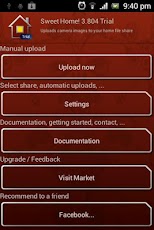
Android:  Sweet Home WiFi Picture Backup


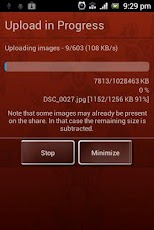
Sweet Home is a simple application which once configured to access your shared folder, it allows you to send the new photos by clicking "Upload Now". And also has an option to automatically upload whenever the phone is connected to the network.  Simple!

This application works really well for me using:  Motorola Atrix 4G & Windows 7 for home server.  It has a free version for try out, but please support the developers and purchase it if you like!  :)

iPhone:  Files Connect


This application is not as simple as Android's Sweet Home for sending photos to the share folder, but it does carry a lot of functionality.  Files Connect is more like a general network file transfer application as the name suggests.

At the end, it is really easy to send photos to the shared folder once this is configured.  You only need to browse for the photos in you phone and "select / copy" them to later "paste" them at the share folder.  Something I liked a lot was the transfer activity monitor which allowed me to see the transfer was not hanged.

In my case I had an iPhone 4G and the share folder in Windows 7 home server.  The application was able to transfer over 1,500 photos with no hangs in a descent amount of time.  It took a little to start the transfer but still less than 1 minute.  I am happy from purchasing the application.

Quick note:
In order to transfer even faster, I browse the phone from the server.  Then PULL the content instead of pushing it.  This significantly reduced the transfer time be 66%.  Just look in your router for the IP the phone is connected to.


General Comment:

If you need applications which directly communicates with your share folder, then search for Samba client applications.  Both of these applications supports the SMB protocol which is what allows the direct access between phone and PC.


Hope this helps others.